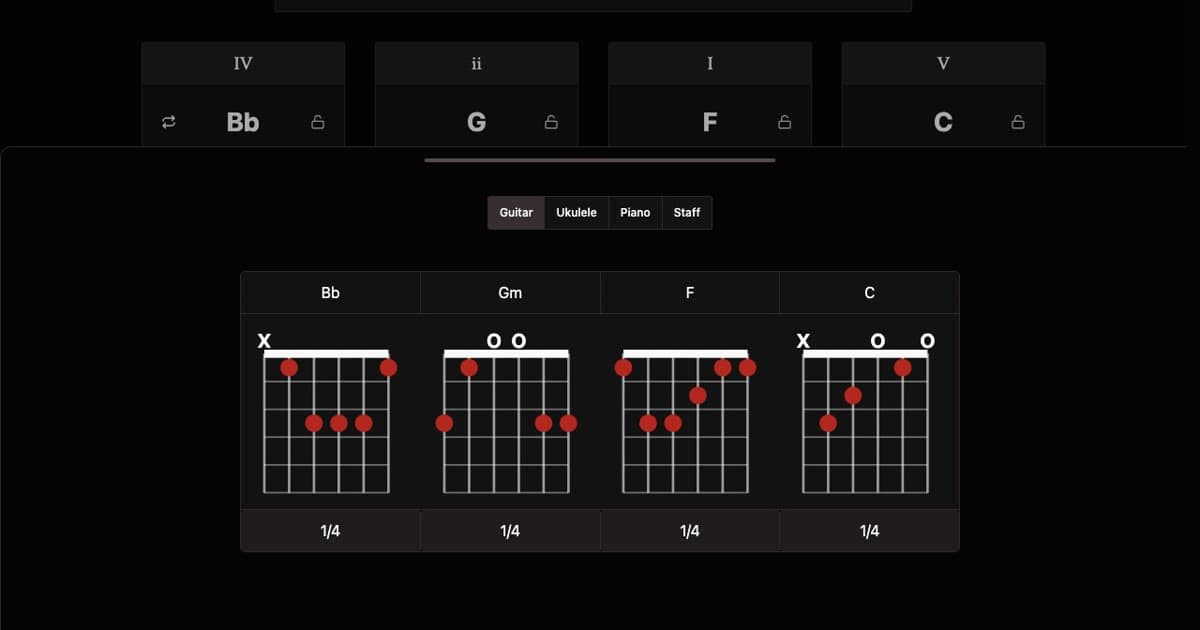
Create guitar chord progressions instantly. Whether you're jamming, writing songs, or learning music theory, generate chord sequences in any key and style. Hear how they sound with built-in playback and see the guitar chord charts for every chord in your progression.
Each chord chart shows you exactly where to place your fingers on the fretboard. Dots mark fret positions, an X means the string is muted, and an O means it rings open. Click any chart to browse alternative guitar tabs and find shapes that suit your hand or playing style.
You'll see a mix of open chords and barre chords depending on the key. If a shape feels awkward, tap through the alternatives — there's usually a simpler voicing further up the neck. You can also switch to piano chords or staff notation using the tabs above.
Shuffling through progressions is one of the fastest ways to stumble onto something that feels right on guitar. Keys like G, C, D, E, and A major are especially worth exploring because they produce chords built around open shapes — the kind that ring out with the sustain and resonance that make acoustic guitar sound so full. If you lock the root to one of these keys, every shuffle will stay in guitar-friendly territory.
The sequencer grid maps naturally to strumming. Think of each active step as a strum — toggle steps on and off to build a rhythmic pattern, then let playback loop while you practice along. Leaving a step silent creates a rest, which gives your strumming hand space to mute or add a percussive scratch.
Voice leading on guitar means finding chord shapes that share fret positions or move as little as possible between changes. When the voicing control is set to neutral, the generator picks inversions with minimal movement — the same principle guitarists use when they choose a C/E shape to transition smoothly into an Am. Less finger travel means cleaner changes and a more connected sound.
Tempo makes a big difference in how a guitar progression feels. Acoustic ballads and fingerpicking tend to sit around 70 to 90 BPM, giving each chord room to breathe. Pop and singer-songwriter strumming usually lands between 100 and 130 BPM. If you're writing something with punk or rock energy, push the tempo past 140 and notice how the same chords take on a completely different character.
Shuffle Chords
Generate new chord progressions with the shuffle button. Press this button lets you quickly cycle through chord, bpm and root configurations.
You can also use the lock controls to stop individual chords or settings from changing on shuffle.
The undo lets you revert changes and shuffles.
Chord Cards
Every chord card is divided into three interactive areas that define how a chord sounds and functions.
The top button displays the scale degree of the chord within the progression, denoted as a roman numeral. These numerals correspond the chords function within the scale. Press this button to cycle through different scale degrees.
The center of the card identifies the name of the chord. Clicking here will restart playback from this chord.
The bottom button displays and controls the quality of the chord. These can be used to shape the emotional color of the sound. Press this button to cycle through different chord qualities.
Root Selector
The root note is the tonal center of your progression and defines which notes and chords belong together.
Select any root around the circle, or use the arrows to transpose chromatically.
Detected Keys
The root note in combination with the chords determines the key of the progression. The detection algorithm analyzes your four chords and identifies the most likely key and mode. A given chord progression can belong to multiple keys and modes.
BPM Control
BPM (beats per minute) is the tempo of your progression. This determines how fast or slow it plays.
Drag the slider or click a preset to jump to a common tempo.
Sequencer
The sequencer grid controls when each sound plays within a bar. The top row triggers piano chord hits and the bottom row triggers the kick drum. Each column is one subdivision of the bar.
Click a step to toggle it on or off. The dropdown at the top left lets you swap between drum styles, and the lock icon preserves the current style when you shuffle.
Voice Leading
Voicings control where on the piano each chord is played. Neutral finds the closest voicing to the previous chord, keeping movement minimal. Up and down bias the direction, creating a sense of rising energy or descending resolution. Click a control to change the voicing for that chord.
Chord Duration
Controls how long each chord is held. 2 means each chord lasts two bars, 1 is one bar per chord, and 1/2 plays each chord for half a bar so they change quicker.
Swing
Adds a rhythmic shuffle to the beat. When swing is on, off-beat notes are delayed slightly, creating a triplet-like feel instead of a straight grid. This transforms rigid patterns into something looser and more musical.
Swing works best with styles that have off-beat hits. If no notes fall on a swing position when you toggle it on, a chord hit is automatically added so you can hear the effect immediately.